记录开始
公司要做一个APP产品,自己会些皮毛,所以在开发的过程中还是遇到了比较多的问题(比如,一开始就安装不上啊,各种报红啊,怎么排查问题啊,轮播插件不响应啊,typescript不怎么会写啊…等等等)。顺便把mbox和typescript给融合进去了。
环境说明
windows系统
android studio安卓模拟器 / 安卓手机
记录罗列
vscode 运行 react-native run android 报错,然后用android-studio运行就好了。
vscode里开发,代码 stylesheet里样式无提示。两个解决方案:
解决方案一,改源码。
参考:https://github.com/microsoft/vscode-react-native/issues/379// 源码 export function create<T extends NamedStyles<T> | NamedStyles<any>>(styles: T): T; // 改进后的: export function create<T extends NamedStyles<T>>(styles: NamedStyles<T>): { [P in keyof T]: RegisteredStyle<T[P]> };解决方案二,版本更新,最新版已修复此问题。(一开始我不知道已有版本不是最新版…)
// 因为之前装的版本是:"@types/react-native": "0.57.63"
export function create<T extends NamedStyles<T> | NamedStyles<any>>(styles: T): T;

// 然后版本更新到:"@types/react-native": "^0.60.0"
export function create<T extends NamedStyles<T> | NamedStyles<any>>(styles: T | NamedStyles<T>): T;
报错:
Unhandled JS Exception: TypeError: undefined is not an object (evaluating 'this._subscribableSubscriptions.forEach')解决方案:
// package.json文件里加上 "resolutions": { "uglify-es": ">=3.3.4" }不打开debug一切正常,当打开debug时报错:
window.deltaUrlToBlobUrl is not a function。
解决方案:localhost 改成 ip 地址。
react-native-swiper,scrollBy用法。
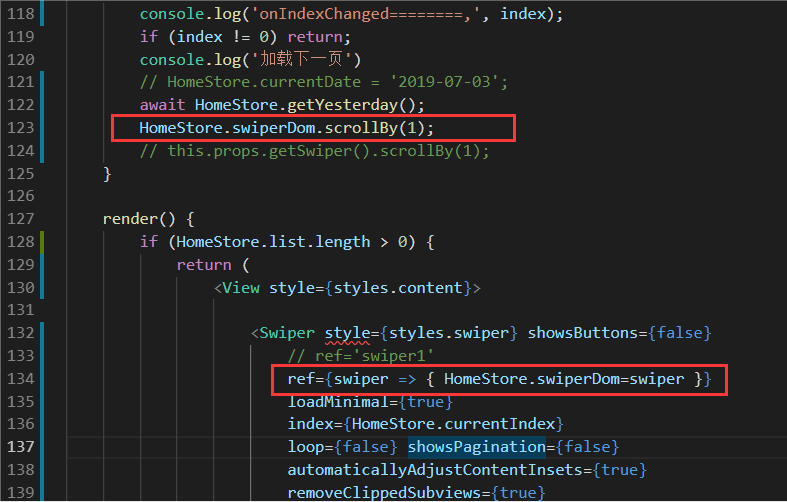
react-native-swiper,轮播数据用map循环动态渲染,onIndexChanged 只执行一次:
拒绝此类方案:拆东墙补西墙 https://www.jianshu.com/p/a46a57484946 !
解决方案:对list数组进行判断。(注:加下面四句代码就行了)
 render() {
     if (HomeStore.list.length > 0) {     // ++++++++ 对list数组进行判断
         return (
             <View style={styles.content}>

                 <Swiper style={styles.swiper} showsButtons={false}
                     ref={swiper => { HomeStore.swiperDom = swiper }}
                     loadMinimal={true}
                     index={HomeStore.currentIndex}
                     loop={false} showsPagination={false}
                     automaticallyAdjustContentInsets={true}
                     removeClippedSubviews={true}
                     bounces={true}
                     onIndexChanged={this.onIndexChanged} >

                     {
                         HomeStore.list.map((item, i) => {
                             return (
                                 <Info item={item} key={i} index={i} list={HomeStore.list} />
                             )

                         })
                     }

                 </Swiper>

             </View>

         );
     } else {   // ++++++++ 对list数组进行判断
         return <View></View>;   // ++++++++ 对list数组进行判断
     }   // ++++++++ 对list数组进行判断
 }
报错:
request:fail url not in domain list。在获取地址时,用的腾讯api解析的经纬度,测试时没问题,上线了就报这个错了。解决方案:微信公众平台,在“设置” -> “开发设置”中设置request合法域名,添加https://apis.map.qq.com。(本来以为他们是一家,不用加,结果还是要加。)
参考:https://blog.csdn.net/weixin_43047977/article/details/84836501 。